Qubit™ 4 荧光计,带 WiFi
Qubit™ 4 荧光计带 WiFi 功能,设计用于准确测定 DNA、RNA 及蛋白的含量,也可测定 RNA 的完整性和质量。重新设计,可通过 WiFi 功能进行数据传输,并可进行 Qubit™ RNA IQ(完整性和质量)检测。
森德仪器提供 赛默飞/Thermo Fisher Qubit™ 4 荧光计,带 WiFi 在全国范围内的代理经销、选型咨询、报价沟通、采购支持、安装培训和售后协同服务,价格面议。

微信扫码沟通
扫码添加技术顾问,发送产品型号或应用需求。
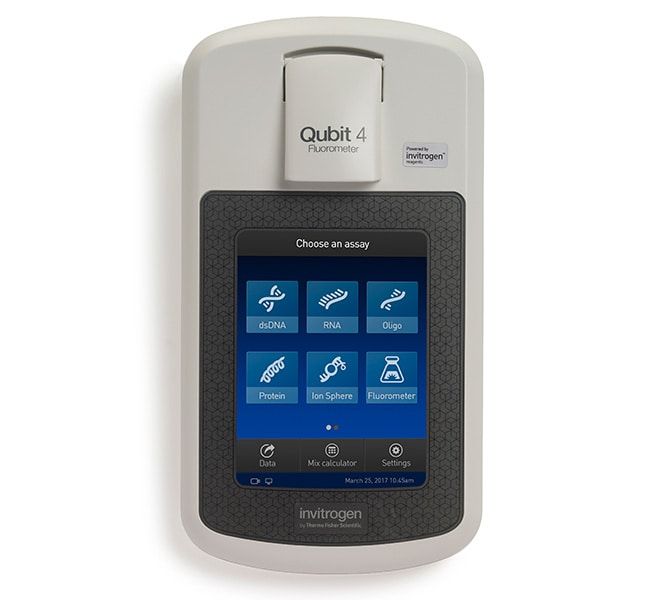
Qubit™ 4 荧光计带 WiFi 功能,设计用于准确测定 DNA、RNA 及蛋白的含量,也可测定 RNA 的完整性和质量。重新设计,可通过 WiFi 功能进行数据传输,并可进行 Qubit™ RNA IQ(完整性和质量)检测。
特点:
荧光计还可使用荧光计模式直接测量样品的荧光。
低浓度时比紫外吸光度的结果更准确
快速、简单、准确地测量 RNA 质量
节省样品和工作台空间
单样品测定较为简单
采购问答
<p>3 years is the standard warranty period. <br/><br/>Find additional tips, troubleshooting help, and resources within our <a href="https://www.thermofisher.com/us/en/home/technical-resources/technical-reference-library/nucleic-acid-purification-analysis-support-center/nucleic-acid-quantification-support.html?icid=faqsc12">Nucleic Acid Quantification Support Center</a>.</p>
<p>The Qubit 4 Fluorometer needs to be updated. The Qubit 4 Fluorometer can be updated with the USB that was provided with the Qubit. If you do not have the USB, we recommend using an empty 2.0GB that is FAT32 formatted. If the USB is not recognized, leave USB plugged in for a few minutes before running the update. This should give you the assay you need to run the Qubit Assay.<br/><br/> You can find the updates on the Technical Resources for <a href="https://www.thermofisher.com/us/en/home/industrial/spectroscopy-elemental-isotope-analysis/molecular-spectroscopy/fluorometers/qubit/qubit-technical-resources.html">Qubit Fluorometers page</a>.</p>
<p>To access the Qubit ssDNA Assay Kit on the Qubit 4, please try selecting the Oligo option from the home screen, and the ssDNA Assay should appear there. If not, please check if you need to update your instrument firmware to the latest version v2.19, which is available for download from the <a href="https://www.thermofisher.com/us/en/home/industrial/spectroscopy-elemental-isotope-analysis/molecular-spectroscopy/fluorometers/qubit/qubit-technical-resources.html#firmware-update"> Technical Resources for Qubit Fluorometers</a> page on thermofisher.com. <br/> For standard/preloaded Qubit assays we do not provide individual .qbt files, but they are included in the firmware itself.</p>
Sende Lab
当前页面用于确认具体仪器型号、参数和采购沟通;如果要从行业热点、测试标准、实验室建设和验收资料角度规划整套能力,可继续查看 Sende Lab。
请填写必填信息,我们将在工作日尽快回复。
<p>To be able to use the Qubit Protein Broad Range Assay (Cat. No. A50668) on the Qubit 4 Fluorometer (Cat. No Q33238) you would need to install the latest firmware on the fluorometer. Please find the latest Qubit 4 firmware (v2.19) on the following webpage: https://downloads.thermofisher.com/Qubit4/v2.19/Qubit4_update_v2.19.pak Save the firmware update on a USB stick and upload it to the Qubit 4 Fluorometer. Once the firmware update has been installed, you will be able to see the Protein BR assay on the Qubit 4 Fluorometer. <br/><br/>Find additional tips, troubleshooting help, and resources within our <a href="https://www.thermofisher.com/us/en/home/technical-resources/technical-reference-library/protein-assays-analysis-support-center/protein-assays-quantitation-support.html?icid=faqsc1">Protein Assays and Quantitation Support Center</a>.</p>
<p>You have to create a user profile and log in. Please follow the instructions for login below: <ul><li>Turn on the device</li> <li>From the home screen, touch the person icon on the top left corner</li> <li>Touch the “Get Started” button</li> <li>Touch the “Create Profile” button</li> <li>information for username and pin</li> <li>Log in by touching the person icon and entering the user info in the sign in fields</li></ul> <br/><br/>Find additional tips, troubleshooting help, and resources within our <a href="https://www.thermofisher.com/us/en/home/technical-resources/technical-reference-library/nucleic-acid-purification-analysis-support-center/nucleic-acid-quantification-support.html?icid=faqsc12">Nucleic Acid Quantification Support Center</a>.</p>
<p>Due to cybersecurity regulations, it is mandatory to create a profile on the device before all features become available. Please follow these steps: <ul><li>Click on the user icon in the upper left corner.</li> <li>Click on Get Started. The device will guide you through the steps to create a profile.</li> <li>Select a pin and confirm the creation of the profile.</li> <li>Log in with this new profile and you should now have all the features available.</li> You can also find instructions on how to set up a user profile on the Qubit 4 Fluorometer on page 2 of the <a href="https://downloads.thermofisher.com/Qubit4/v2.18/Qubit%204%202.18%20Release%20Notes.pdf">release notes.</a> <br/><br/>Find additional tips, troubleshooting help, and resources within our <a href="https://www.thermofisher.com/us/en/home/technical-resources/technical-reference-library/nucleic-acid-purification-analysis-support-center/nucleic-acid-quantification-support.html?icid=faqsc12">Nucleic Acid Quantification Support Center</a></p>
<p>Custom assays can be designed on Qubit 3 and Qubit 4 Fluorometers. For more information, please see the following <a href="https://www.thermofisher.com/uk/en/home/industrial/spectroscopy-elemental-isotope-analysis/molecular-spectroscopy/fluorometers/qubit/qubit-technical-resources.html#custom-assays">link.</a><br/><br/>Find additional tips, troubleshooting help, and resources within our <a href="https://www.thermofisher.com/us/en/home/technical-resources/technical-reference-library/nucleic-acid-purification-analysis-support-center/nucleic-acid-quantification-support.html?icid=faqsc12">Nucleic Acid Quantification Support Center</a></p>
<p>Due to the security settings of the Qubit 4 Fluorometer, with WiFi (Cat. No. Q33238), you will need to be logged in as a user to access the full settings menu. When not logged in as a user, options such as instrument settings, software update and system verification remain inactive.<br/><br/>Find additional tips, troubleshooting help, and resources within our <a href="https://www.thermofisher.com/us/en/home/technical-resources/technical-reference-library/nucleic-acid-purification-analysis-support-center/nucleic-acid-quantification-support.html?icid=faqsc12">Nucleic Acid Quantification Support Center</a></p> You can find instructions on how to set up a user profile on the Qubit 4 Fluorometer on page 2 of the Firmware <a href="https://downloads.thermofisher.com/Qubit4/v2.18/Qubit%204%202.18%20Release%20Notes.pdf">release notes.</a></p>
<p>The Qubit 4 Fluorometer, with WIFI (Cat. No. Q33238), does not require any specific routine maintenance. However, based on customer experience, we recommend the following: <br/><br/> <ul><li>From time to time, it may be useful to check the opening of the Qubit for dust particles and dirt. If needed, you can use a lint-free cloth or lenses cleaning paper towels to wipe the inside of the Qubit with some 75%-95% ethanol.</li><br/><li>If you experience inaccurate measurements, regardless of the kit you use, we recommend testing the light source of the instrument with the Qubit 4 System Verification Assay Kit (Cat. No. Q33238).</li></ul><br/><br/>Find additional tips, troubleshooting help, and resources within our <a href="https://www.thermofisher.com/us/en/home/technical-resources/technical-reference-library/nucleic-acid-purification-analysis-support-center/nucleic-acid-quantification-support.html?icid=faqsc12">Nucleic Acid Quantification Support Center</a>.</p>
<p>To access the necessary file for the Qubit 1X dsDNA High Sensitivity (HS) and Broad Range (BR) Assay Kits, update the Qubit 4 firmware using this <a href="https://www.thermofisher.com/us/en/home/industrial/spectroscopy-elemental-isotope-analysis/molecular-spectroscopy/fluorometers/qubit/qubit-technical-resources.html">link</a>. The newest firmware contains the required assay file.</p>